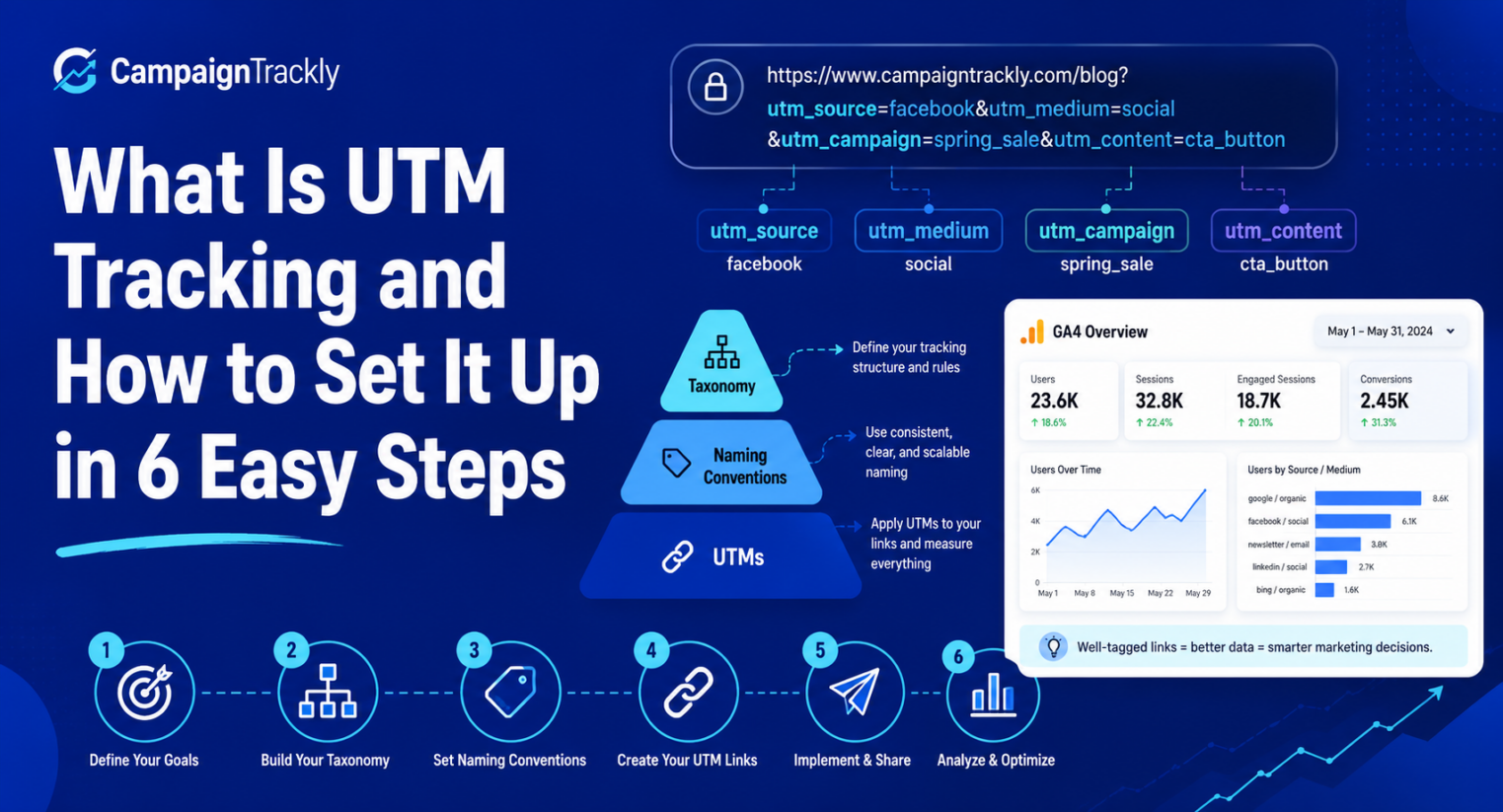
Most UTM tracking guides explain the UTM tags. This guide explains the strategy behind using them correctly across campaigns, teams, and reporting systems.
In today’s omnichannel marketing environment, a strong UTM tracking strategy is no longer optional. It is the foundation for clean campaign reporting, reliable attribution, and smarter marketing decisions.
When campaign tracking links are created manually across teams, spreadsheets, agencies, and platforms, tracking data can quickly become fragmented. A clear UTM tracking strategy helps you standardize how campaign links are named, tagged, approved, and reported.
What Is UTM Tracking?
UTM tracking is the process of adding tracking or UTM parameters to campaign URLs so analytics tools can understand where traffic came from.
These parameters help identify the source, medium, campaign, content, keyword, or campaign ID behind a website visit.
UTM Tracking Example
Here is a simple UTM tracking link:
https://example.com/demo?utm_source=linkedin&utm_medium=paid_social&utm_campaign=summer_launchThis link tells your analytics platform that the visitor came from LinkedIn, through a paid social campaign, as part of the summer launch campaign.
Without UTM tracking, that same visit may still appear in your analytics tool, but the campaign context can be incomplete, inconsistent, or difficult to report on.
When UTM Tracking Becomes a Reporting Problem
UTM tracking feels simple when one person is creating a few links. But the process becomes harder when multiple people create links across email, paid social, search, display, webinars, QR codes, partner campaigns, and sales outreach.
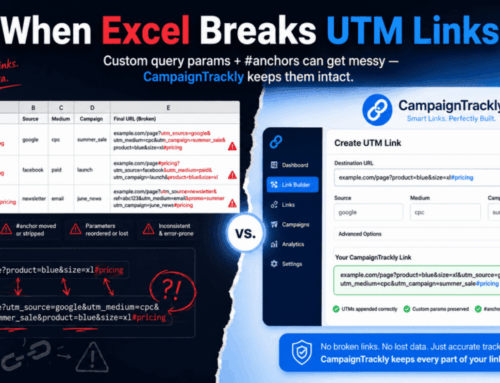
At that point, small differences create big reporting problems. For example, linkedin, LinkedIn, and linked-in may appear as separate traffic sources. The campaign may be the same, but your reports become fragmented.
The Real Goal Is Not Just Tagged Links
The real goal is reporting consistency. A strong UTM tracking strategy helps your team create links that roll up cleanly by campaign, channel, source, medium, region, team, and business objective.
What Is a UTM Tracking Strategy?
A UTM tracking strategy is the system your team uses to decide how campaign links should be named, tagged, approved, shared, and reported.
It turns UTM tracking from a manual link-building task into a repeatable process for cleaner campaign data.
Why Strategy Matters
One person can create a UTM link manually. But once multiple teams, agencies, regions, tools, and channels are involved, manual UTM tracking can quickly become messy.
Without a strategy, campaign names get inconsistent, source and medium values multiply, spreadsheets become outdated, and reporting becomes harder to trust.
Why Do You Really Need a UTM Tracking Strategy?
Website links are everywhere. We click links to read articles, buy products, book appointments, download resources, register for events, and move between digital experiences.
Every Link Can Carry Campaign Data
With billions of people using the Internet, that creates a massive number of links and clicks every day. For marketers, each campaign link can carry valuable information about source, medium, campaign, content, audience, and performance.
Marketing ROI Depends on Clean Tracking
The website analytics market continues to grow as businesses invest more in understanding how digital activity drives results. As digital marketing takes a larger share of marketing budgets, a clear and easy-to-implement UTM tracking strategy has become a strategic business requirement.
Every campaign link across email, social, paid ads, blogs, apps, QR codes, and partner campaigns can help explain what worked. However, without a unified system, campaign names and UTM values often become inconsistent across channels.
Messy Tracking Creates Messy Reporting
When teams rely on disconnected spreadsheets or manual tagging, reporting can break quickly. The result is inaccurate attribution, duplicated campaign values, fragmented dashboards, and missed optimization opportunities.
To avoid that, you need a scalable and structured UTM tracking strategy. The framework below is built around six essential pillars.
The Six Pillars of a Best-in-Class UTM Tracking Strategy
A well-defined UTM tracking strategy gives your team a repeatable process for campaign link creation. It also helps every stakeholder understand which values to use, when to use them, and how those values will appear in reporting.
Here Are the Six Core Components
The six steps below will help you map campaign goals, channels, media types, tagging rules, taxonomy, and workflows. Together, they create a more reliable foundation for campaign reporting.
1. Map Marketing Channel Objectives to Campaign Categories
Start by grouping your campaigns by their strategic objective. Common categories include acquisition, lead generation, conversion, retention, and upsell.
Why Campaign Categories Matter
These categories should map directly to your analytics platform and reporting structure. That way, you can roll up performance by buyer journey stage, campaign objective, or business goal.
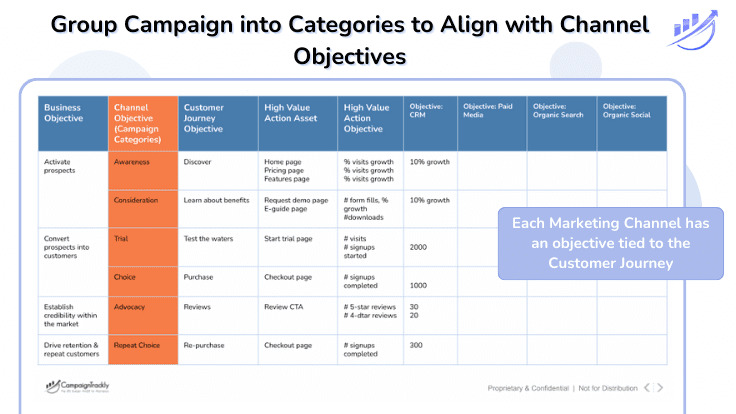
Examples of Marketing Campaign Categories
Here are five common campaign categories you can use when building your UTM tracking strategy.
- Acquisition — campaigns focused on driving relevant traffic to your web properties, including social media, cold email, and advertising. Common KPIs include traffic, reach, and page views.
- Lead Generation — campaigns designed to generate marketing leads. Common KPIs include form submissions, email addresses captured, follow-up email opens and clicks, and resource downloads.
- Conversion — campaigns that move trialists, prospects, or leads toward demos, webinars, training sessions, or sales opportunities. Common KPIs include marketing qualified leads, opportunities created, and opportunities closed.
- Retention — campaigns designed to keep customers engaged and invested in your product or service. Common KPIs include churn rate, customer lifetime value, product engagement, and renewal activity.
- Upsell — campaigns focused on promoting adjacent products, add-ons, upgrades, or expanded services to existing customers.
2. Define Your Primary Marketing Channels and Mediums
Next, standardize your main marketing channels. These may include search, social, email, display, SMS, video, PR, affiliate, publisher, and other campaign types.
Why Channel Standardization Matters
This step matters because channels often map directly to your utm_medium values. If one team uses paid_social, another uses paid-social, and another uses paidsocial, your analytics reports can split one channel into multiple rows.
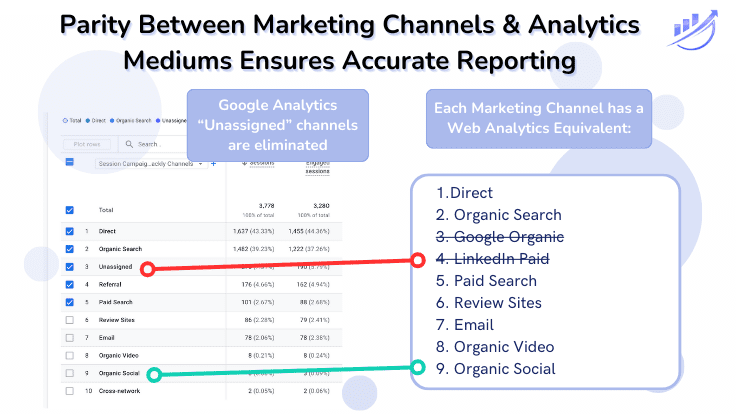
Map Channels to Analytics Mediums
Make sure every channel used in your tracking process has a corresponding medium value in your web analytics platform. This helps you compare apples to apples and avoid “missing” or fragmented data.
- Search
- Social
- Display
- SMS
- Video
- PR
- Affiliate
- Publisher
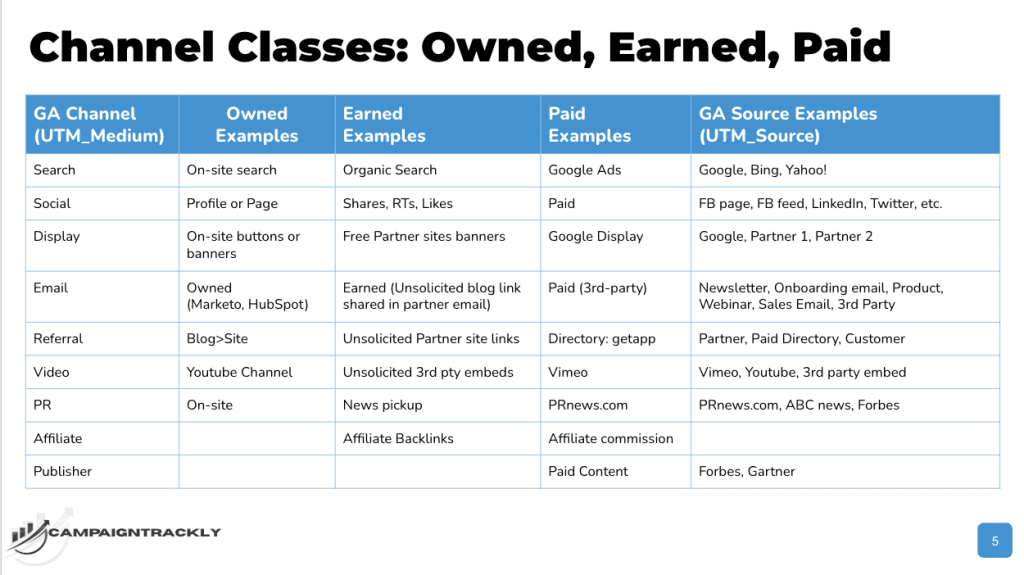
3. Split Channels Into Three Media Types
Once you define your channels, split them into owned, earned, and paid media. This helps you decide where custom UTM tracking should be used and where it should be avoided.
Owned, Earned, and Paid Media
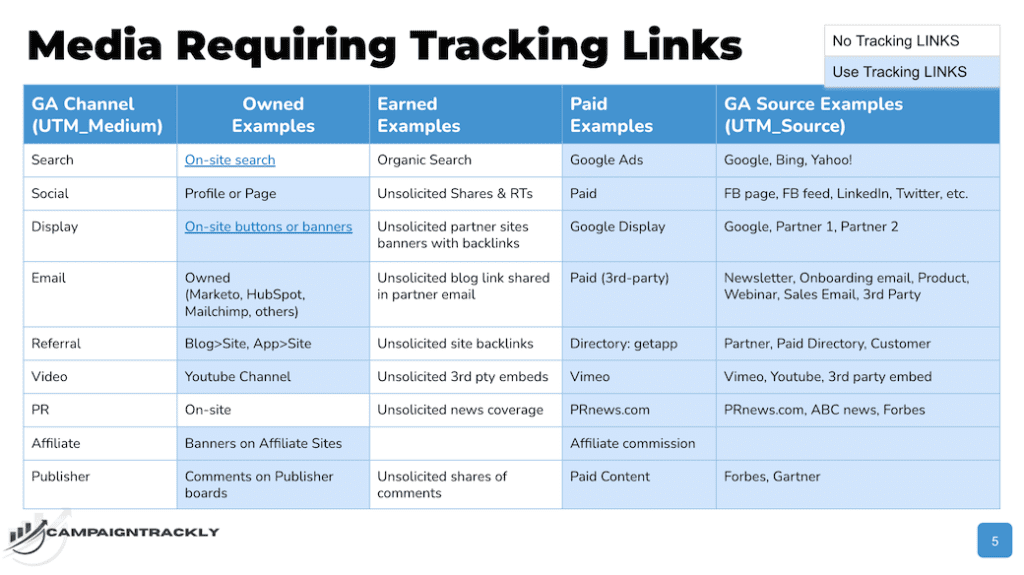
This step determines whether your analytics tool can identify the traffic automatically or whether your team needs to manually tag links with UTM parameters. In most cases, owned and paid campaign links should be tagged, while earned media should not be manually tagged.
View the media breakdown by channel type in the image below:
4. Identify Which Media Your UTM Tracking Process Should Activate For
Do not tag what you cannot control. Your UTM tracking process should clearly define which links require tracking and which links should stay untagged.
Earned Media Example
Organic search is an example of earned media. You should not add UTM codes to internal website links or webpage URLs for SEO traffic because organic search attribution should be handled by search engines and analytics platforms.
Adding tracking code to internal or organic search links can break attribution models. For that reason, organic search is not usually tagged with custom UTM parameters.
Owned Referral Media Example
The same non-tracking rule applies to internal website links within the same site. However, if your blog is on a separate platform from your main corporate site, or if you have a mobile app, you may need UTM tracking links when referring traffic between those separate owned properties.
In that case, the traffic can be treated as owned referral traffic. The key is to define the rule clearly before teams start creating links.
Use the image below to define mandatory tracking link promotional channels by media type:
5. Create a Campaign Taxonomy and Tagging Playbook
A campaign taxonomy is the naming system your team uses for campaigns, tactics, channels, UTM values, and reporting categories. A tagging playbook turns that system into clear rules your team can follow.
Why a Shared Playbook Matters
Without a shared playbook, every team may create campaign names and UTM values differently. That creates duplication, reporting confusion, and unnecessary cleanup work later.
Once you define campaign objectives, channels, media types, and tracking requirements, you can finalize your marketing campaign link tracking strategy and operational taxonomy.
Map Your Taxonomy Before Campaigns Go Live
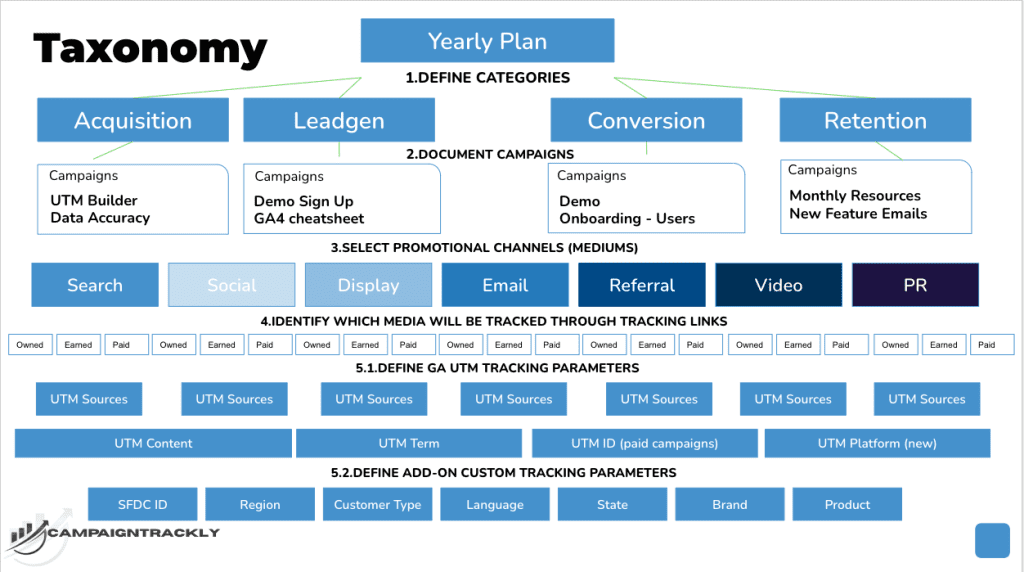
Your taxonomy should show how campaigns, channels, source values, medium values, content values, and reporting categories fit together. This is especially important when multiple tools, regions, agencies, or partners are involved.
Use the example in the image below to map your taxonomy:
6. Embed UTM Tracking Into Your Campaign Workflow
This step is mandatory, especially if multiple teams, agencies, or stakeholders are involved in campaign production and delivery. UTM tracking should not be treated as a last-minute task.
Make UTM Tracking Part of Production
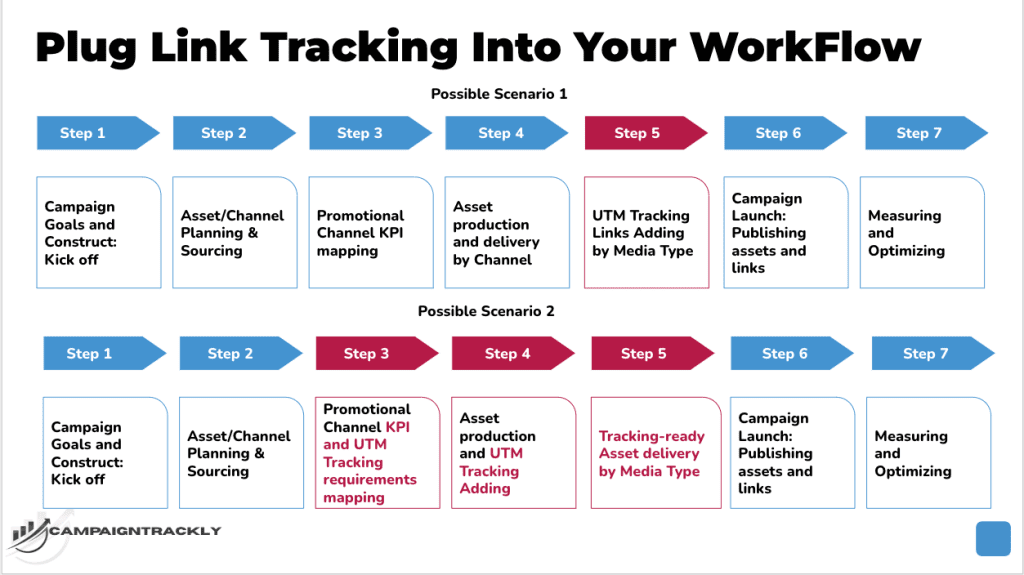
Map your production workflows and identify where tracking should be added, reviewed, approved, and stored. Every team managing content, media, email, social, partnerships, events, or external campaigns should know when and how to apply UTM tags consistently.
This exercise will help you decide whether your team can manage UTM tracking with a spreadsheet or whether you need an automated UTM builder that can scale your tracking operations.
Train Teams Before Launch
If different teams deliver campaigns across different channels, you need to map each team’s process and identify where link tracking requirements should be added. The goal is to improve reporting without disrupting workflows more than necessary.
All teams affected by the new tracking strategy need to understand the process and be trained to follow it. This is essential for adoption, consistency, and long-term reporting accuracy.
Conclusion
A strong UTM tracking strategy creates consistency, clarity, and confidence in your marketing data. It gives every campaign, channel, and touchpoint a cleaner reporting foundation.
Cleaner Tracking Creates Better Decisions
Without a strategy, campaign names quickly become inconsistent across platforms, especially when tracking is managed manually through spreadsheets. This leads to mismatched reporting, wasted effort, and data your team may not fully trust.
By following these six steps, you can reduce guesswork and build a stronger foundation for unified dashboards, cleaner attribution, and better campaign decisions.