
What Are URL Parameters? Quick Explanation
URL parameters are extra pieces of information added to the end of a web address.
They are separated from the main URL with a question mark.
URL parameters are also called:
- query parameters
- query strings
- URL query parameters
- URL params
These terms are often used interchangeably.
URL Parameter Example
Here is a simple URL with one parameter:
https://example.com/products?category=shoesThe parameter is:
category=shoesThat tells the website or analytics system that the user is viewing, filtering, or interacting with the “shoes” category.
Now here is a URL with multiple parameters:
https://example.com/products?category=shoes&color=blue&size=8This URL has three parameters:
| Parameter | Value |
|---|---|
category |
shoes |
color |
blue |
size |
8 |
Each parameter is separated by an ampersand:
&So the structure looks like this:
?parameter=value¶meter=value¶meter=valueHow URL Parameters Work
A standard URL has several parts.
Example:
https://example.com/products?category=shoes&color=blue#reviewsThis URL includes:
| Part | Example | Meaning |
|---|---|---|
| Protocol | https:// |
How the browser loads the page. |
| Domain | example.com |
The website. |
| Path | /products |
The page. |
| Query string | ?category=shoes&color=blue |
The URL parameters. |
| Anchor | #reviews |
A specific section of the page. |
The order matters. URL parameters should come before the anchor or hashtag section.
Correct:
https://example.com/products?category=shoes#reviewsIncorrect:
https://example.com/products#reviews?category=shoesLearn What URL Parameters Are
What Are URL Parameters Used For?
URL parameters can be used for many different purposes.
Some are technical. Some are used for marketing. Some help websites personalize content.
Common uses include:
- filtering products
- sorting search results
- storing session information
- passing referral information
- tracking marketing campaigns
- identifying ad clicks
- sending form values
- controlling website behavior
- reporting traffic sources in analytics tools
For example, an ecommerce site may use URL parameters to filter products:
https://example.com/shop?color=red&size=medium
A software company may use URL parameters to preselect a pricing plan:
https://example.com/signup?plan=enterprise
A marketing team may use URL parameters to track a campaign:
https://example.com/demo?utm_source=linkedin&utm_medium=paid_social&utm_campaign=q3_demo_push
That last example uses UTM parameters.
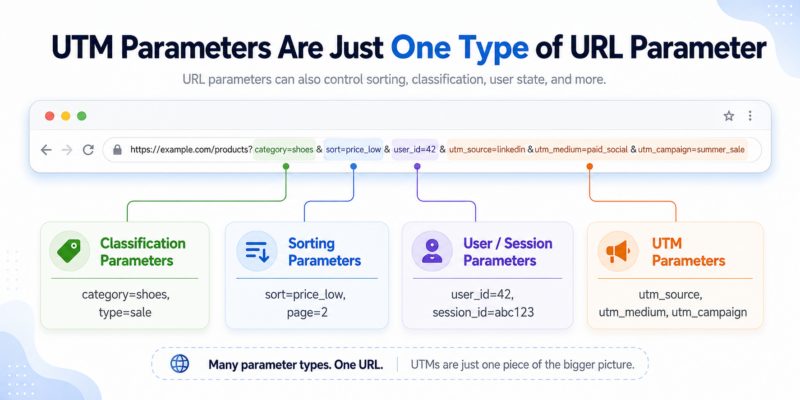
Are UTM Parameters the Same as URL Parameters?
Not exactly.
UTM parameters are a specific type of URL parameter used for marketing campaign tracking.
So the relationship looks like this:
- URL parameters = the broader technical category
- UTM parameters = the marketing tracking version
All UTM parameters are URL parameters.
But not all URL parameters are UTMs.
For example:
?color=blueThis is a URL parameter, but it is not a UTM parameter.
Meanwhile:
?utm_source=linkedinThis is both a URL parameter and a UTM parameter.
What Are UTM Parameters?
UTM parameters are URL parameters used to tell analytics tools where traffic came from.
The standard UTM parameters are:
| UTM Parameter | What It Tracks |
|---|---|
utm_source |
The traffic source, such as Google, LinkedIn, newsletter, or Facebook. |
utm_medium |
The marketing medium, such as email, paid_social, cpc, or banner. |
utm_campaign |
The campaign name. |
utm_content |
The creative, link, ad, button, or placement. |
utm_term |
The keyword or paid search term. |
utm_id |
A campaign ID, often used for GA4 cost import and campaign-level reporting. |
A UTM tracking URL might look like this:
https://example.com/demo?utm_source=linkedin&utm_medium=paid_social&utm_campaign=summer_launch&utm_content=blue_adThis tells your analytics platform:
- the visitor came from LinkedIn
- the channel was paid social
- the campaign was
summer_launch - the specific ad or content was
blue_ad
Without these parameters, your reporting may still show traffic, but it may not show the full campaign context.
Family of URL Parameters & All Types
THE URL PARAMETER FAMILY
URL Parameters vs UTM Parameters
Here is the easiest way to understand the difference.
| Concept | Meaning | Example |
|---|---|---|
| URL parameter | Any extra value added to a URL after ? |
?plan=pro |
| Query parameter | Another name for a URL parameter | ?color=blue |
| UTM parameter | A marketing tracking parameter | ?utm_source=linkedin |
| Query string | The full parameter section of a URL | ?utm_source=linkedin&utm_medium=email |
So when someone says “URL parameters,” they may be talking about any kind of parameter.
When someone says “UTM parameters,” they are usually talking about marketing attribution.
Related UTM Guides
- Need a governed campaign url builder for your utm tags? CampaignTrackly can help!
- The 3-minute campaign tracking checklist
- The 1-minute UTM tag separator checklist
- The GA4 UTM Builder for Teams
Prefer UTM Videos?
Take the URL / UTM Parameter Quiz
URL Parameters FAQ
What are URL parameters?
URL parameters are extra pieces of information added to the end of a web address. They usually appear after a question mark and help websites pass, filter, sort, track, or personalize information.
What is an example of a URL parameter?
A simple example is https://example.com/pricing?plan=pro. In this URL, plan is the parameter name and pro is the parameter value.
Are URL parameters and query parameters the same thing?
In most everyday use, yes. URL parameters, query parameters, query strings, URL query parameters, and URL params are often used to describe the same part of a URL.
What is the difference between a URL parameter and a query string?
The query string is the full section of the URL that starts with a question mark. A URL parameter is one name-and-value pair inside that query string. For example, in ?category=shoes&color=blue, the full query string has two parameters: category=shoes and color=blue.
What are URL parameters used for?
URL parameters are used for filtering products, sorting search results, passing referral values, storing session information, preselecting options, tracking campaigns, identifying ad clicks, and reporting traffic sources in analytics tools.
Are UTM parameters the same as URL parameters?
Not exactly. UTM parameters are a specific type of URL parameter used for marketing campaign tracking. All UTM parameters are URL parameters, but not all URL parameters are UTMs.
Can a URL have more than one parameter?
Yes. A URL can have multiple parameters. The first parameter starts with a question mark, and each additional parameter is separated with an ampersand. For example: ?category=shoes&color=blue&size=8.
Where should URL parameters go when a URL also has a hashtag?
URL parameters should come before the hashtag or anchor. The correct format is https://example.com/page?parameter=value#section, not https://example.com/page#section?parameter=value.







