Interactive Google UTM Checker Validates Your GA4 Campaign Tracking Parameters
This interactive Google UTM checker and validation tool helps marketers check whether their UTM campaign parameters — including utm_source, utm_medium, and utm_campaign — follow best practices for Google Analytics 4 (GA4) campaign tracking and channel classification.
👉 What Are UTM Parameters in Marketing?
UTM parameters are small pieces of text added to the end of a URL that allow marketers to track where website traffic comes from and how campaigns perform.
When someone clicks a link containing UTM tags, analytics platforms such as Google Analytics 4 (GA4) can read those parameters and attribute the visit to a specific marketing source, channel, or campaign.
Why UTM Validation Matters for GA4 Campaign Tracking
Campaign tracking only works when your UTM parameters are clean, consistent, and aligned with analytics best practices. A single mistake in utm_source, utm_medium, or utm_campaign can fragment reporting, misclassify traffic, or hide the true performance of your marketing campaigns.
Many marketers assume that as long as UTM tags are in place, their reporting is correct. In reality, inconsistent naming, formatting errors, and incorrect source-medium combinations coming from manual campaign url builder tools frequently push traffic into the wrong channel group or create duplicate campaign values inside Google Analytics 4.
To help marketers prevent these issues before launching a campaign, we created an Interactive UTM Validation Tool.
Stop "Direct" Visits from Stealing Your Campaign Traffic
What the Google UTM Checker Does
This tool allows you to quickly test your UTM parameters, detect formatting problems, preview your campaign link fragment, and see how GA4 is likely to classify your traffic based on the values you enter.
Use it to validate your tags before publishing links in ads, emails, social posts, or paid media campaigns.
Try the Interactive Google UTM Checker:
Is My Tracking Safe? ✨
Interactive validation tool based on GA4 rules
How to Use the Google UTM Checker Tool
Using the tool takes only a few seconds and helps prevent common campaign tracking mistakes.
Step 1: Type or paste your utm_medium in the Google UTM Checker first field
In the Medium field, enter the value you plan to use for utm_medium.
This represents the marketing channel or delivery method.
Common examples include:
-
cpc
-
email
-
referral
-
paid_social
-
display
Your medium helps analytics platforms determine how the traffic should be grouped in acquisition reports.
Step 2: Enter the traffic source – the utm_source in the next field
In the Source field, enter the platform or publisher sending the traffic.
Examples include:
-
google
-
linkedin
-
facebook
-
newsletter
-
partner-site
The source identifies where the click originated.
Step 3: Add the utm_campaign in the campaign name field of the Google UTM checker
The Campaign Name field corresponds to the utm_campaign parameter.
This parameter identifies the specific marketing initiative.
Example campaign names:
-
spring_launch_2026
-
webinar_series_q1
-
black_friday_sale
Using consistent campaign naming conventions helps teams analyze performance across campaigns and channels.
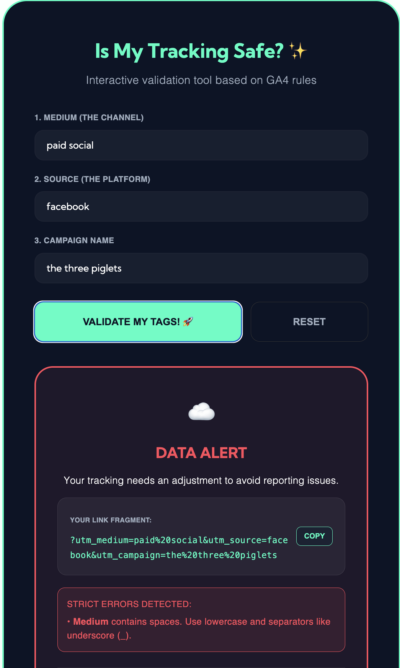
See the Google UTM Parameter Validator in Action. Use it to standardize utm_campaigns.
Step 4: Run the GA4 UTM parameter validation
Click “Validate My Tags” to analyze the parameters.
The tool will:
• detect formatting issues
• highlight potential campaign tracking risks
• generate a preview of the campaign URL fragment
• estimate how GA4 will group the traffic channel
If issues are detected, the tool will provide recommendations to improve your tagging structure.
Step 5: Copy your validated link fragment
If your parameters pass validation, you can copy the generated URL fragment and append it to your destination URL when building campaign links.
Example output:
You can then attach this fragment to any landing page URL to enable accurate campaign tracking.
Why Validating GA4 UTM Parameters Improves Marketing Reporting
UTM parameters drive the attribution data used in marketing dashboards and campaign reports.
If parameters are inconsistent or incorrectly structured, analytics platforms may:
-
misclassify traffic into the wrong channel
-
create duplicate campaign values
-
inflate referral traffic
-
fragment campaign reporting
Validating your UTM parameters before launching a campaign helps maintain clean attribution data and reliable performance reporting.
Pre-Launch Tool
Free 3-Minute GA4 UTM Campaign Tracking QA Checklist
Don’t launch with broken tracking. Use this quick 3-minute guide to validate your UTM parameters and ensure 100% accurate attribution.
The QA Checklist Covers:
👉 Get the 3-Minute QA Checklist
Stop “Unassigned” traffic before it starts.
FAQS
What does the Interactive UTM Validation Tool check?
The tool checks the structure of your UTM parameters including utm_source, utm_medium, and utm_campaign. It flags formatting issues, naming inconsistencies, and potential tracking problems that could affect GA4 campaign reporting.
Why should I validate UTM parameters before launching a campaign?
Incorrect UTM parameters can cause traffic to appear in the wrong analytics channel, split campaign reporting across multiple values, or hide the real performance of marketing campaigns.
Does this UTM validation tool work for GA4?
Yes. The tool is designed to validate parameters commonly used for Google Analytics 4 campaign tracking and helps identify values that may affect channel grouping and attribution.
Do I need all UTM parameters for campaign tracking?
Most campaigns use three core parameters: utm_source, utm_medium, and utm_campaign. These identify where traffic came from, how it was delivered, and which campaign generated the visit.
Is the Interactive UTM Validation Tool free?
Yes. The tool is free to use and helps marketers check their campaign tags before publishing tracked URLs.