What are UTM tag separators?
UTM tag separators are special characters like dashes and underscores, used to separate the words in the UTM link. They make sure that the campaign tracking parameters remain readable and consistent in GA4 analytics reports.
UTM parameters are one of the most important building blocks of marketing attribution.
They tell analytics platforms like Google Analytics 4 (GA4) where traffic comes from, how users arrived, and which campaigns generated results.
However, a small detail in how those parameters are written can quietly break your reporting. One of the most common issues appears when teams create multi-word UTM values using characters that are not URL-safe.
To avoid attribution errors, fragmented reports, and misclassified traffic, it’s best to follow a simple rule:
Use only dashes (-) or underscores (_) as separators in multi-word UTM tags.
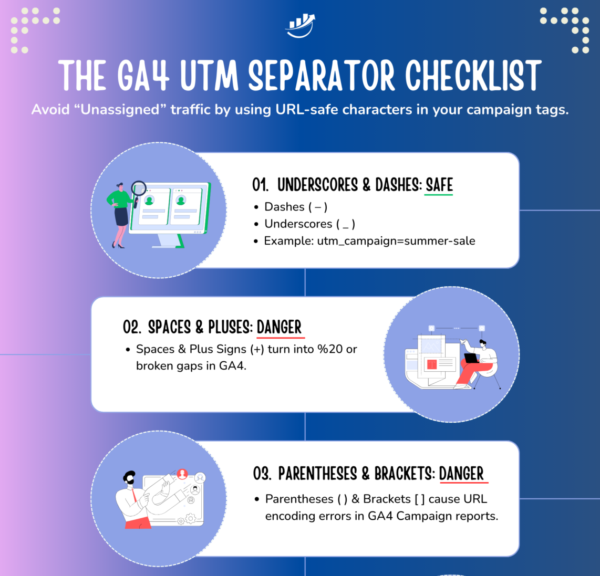
1-Minute UTM Separators Checklist
Why Dash and Underscore Separators Are the Gold Standard
When campaign names contain multiple words, separators help maintain readability and structure.
The two safest options are:
(-), a.k.adash
(_), a.k.aunderscore
These characters are considered URL-safe, meaning browsers and analytics platforms interpret them as literal text without needing special encoding.
Example:
utm_campaign=2026_q1_product-launch
utm_campaign=2026_q1_product_launch
Because these separators are treated consistently by browsers, ad platforms, and analytics tools, they ensure that campaign metadata passes cleanly from the ad click to the landing page.
Using standard separators helps:
- preserve campaign metadata during redirects
- prevent reporting fragmentation
- maintain consistent naming conventions
- ensure analytics platforms aggregate campaign data correctly
When these conventions are followed, GA4 can accurately compare campaign performance across channels without the risk of traffic appearing as “Unassigned.”
The Problem With Special Characters in UTM Tags
Many teams unknowingly introduce problems by using characters like:
( ), [], |, +
These characters may appear harmless, but they can interfere with how URLs are processed and how analytics platforms like GA4 interpret campaign data.
Below are the most common technical issues they create.
1. Character Confusion in Analytics Platforms
Some characters have functional meaning inside analytics systems. For example, the pipe symbol | is a regex operator meaning “OR.”
If used inside a campaign name such as:
utm_campaign=spring|summer_sale
it may interfere with internal filters or channel classification rules used by analytics tools like GA4.
This can lead to:
- incorrect campaign grouping
- misclassified channels
- distorted attribution reporting
Even if problems are not immediately visible, they can appear later when filters or dashboards rely on pattern matching.
2. URL Encoding Can Fragment Reporting
Certain characters are automatically converted into percent-encoded values by browsers, email clients, and redirect systems.
For example:
( )
may become:
%28
%29
This means the same campaign might appear in analytics reports as multiple entries, such as:
spring_sale
spring%28sale%29
When that happens, performance metrics become fragmented across several variations of the same campaign.
3. Redirects May Strip Special Characters
Another hidden risk occurs during redirects. Some web servers, URL shorteners, or security filters automatically clean or remove special characters when redirecting users.
If this happens, the campaign parameters may be modified or stripped entirely before the visitor reaches the landing page.
The result is lost attribution data and traffic that may appear as:
- Direct
- Unassigned
- or attributed to the wrong channel
4. Spaces between words impact link accuracy and health.
Spaces between words should be avoided in UTM values because browsers convert them into %20 or +, which can fragment campaign reporting and require extra time to reconcile the data.
A Simple UTM Separator Best Practice
To maintain clean campaign tracking, follow a simple naming rule:
Use only dashes or underscores for multi-word UTM values.
Example campaign naming format:
utm_campaign=2026_q1_product-launch_signup
or
utm_campaign=2026_q1_product_launch_signup
Both formats are safe, consistent, and compatible with analytics platforms. The most important thing is consistency across all marketing channels.
Why Consistent UTM Formatting Matters
When teams follow a unified taxonomy for campaign parameters, analytics platforms can reliably group campaign traffic and compare performance.
Consistent UTM formatting helps prevent:
- fragmented campaign reports
- misclassified traffic sources
- broken attribution data
- unreliable marketing dashboards
Maintaining simple, URL-safe naming conventions protects the integrity of your campaign metadata from the moment a user clicks an ad until the visit is recorded in analytics.
The Bottom Line
UTM tracking only works when campaign parameters remain intact throughout the user journey. By sticking to dash (-) or underscore (_) separators and making sure there is only one question mark and one ampersand in each link, marketing teams can avoid technical conflicts with analytics tools, preserve attribution accuracy, and keep reporting clean.
It’s a small detail, but one that plays a critical role in maintaining the integrity of your campaign tracking data.
FREE Download
The GA4 UTM Separator & Character Checklist
Don’t let a single %20 or + sign fragment your reports. Use this quick checklist to ensure your campaign separators are 100% URL-safe before you publish your marketing link.
This Checklist HELPS YOU ELIMINATE:
🛡️ Get the UTM Character Checklist
Clean links = Clean Data. Join 5,000+ Pros.
UTM Naming Convention Best Practices (FAQ)
What causes “Unassigned” traffic in GA4?
“Unassigned” traffic appears when Google Analytics cannot classify a visit into a defined channel. This often happens when campaign parameters are missing, formatted incorrectly, or broken during redirects.
What separators should be used in UTM parameters?
The safest separators for multi-word UTM values are dashes (-) and underscores (_). These characters are URL-safe and are interpreted consistently by browsers, ad platforms, and analytics tools.
Example:
utm_campaign=summer_sale
Why should special characters be avoided in UTM tags?
Special characters like |, +, (, ), or [ ] may trigger URL encoding or interfere with analytics filters. When this happens, the same campaign may appear as multiple entries in reports, fragmenting performance data.
Why is lowercase important for UTM parameters?
Google Analytics treats uppercase and lowercase values as different entries. For example:
utm_source=facebook
These would appear as two separate traffic sources, splitting campaign data across multiple rows.
What is the correct structure of a tracking URL?
A properly structured campaign URL follows this pattern:
The ? symbol begins the query string and each parameter is joined using &.
Can spaces be used in UTM parameters?
Spaces should be avoided. Browsers convert spaces into %20 or +, which can cause inconsistent campaign names and fragmented reporting.
Instead use:
spring_sale
Why do redirects sometimes break UTM parameters?
Some web servers, URL shorteners, and security filters remove or modify special characters during redirects. When that happens, campaign parameters may be lost before reaching the destination page.
How can marketers ensure consistent UTM naming conventions?
Teams should follow a standardized naming convention for campaign parameters and maintain a shared tag library. Automation tools can help enforce consistency and prevent duplication.