UTM Source (utm_source) is the second of five standard analytics tracking tags used to measure digital campaign performance across paid and most owned media.
In tutorial #2, we go over how UTM Source, or utm_source as it appears in your marketing links, fits into your reporting and how to set it up correctly to build a solid digital performance tracking strategy.
- Tut # 2 Takeaways – What You Will Learn:
- Let’s Start with What UTM Source Really Is
- Key Things to Remember about UTM Source
- How to Build and Maintain an Effective UTM Source Library for Optimal Reporting
- Time for a Quiz
- Not Signed up for the Series Yet? Sign Up Here:
- Say Good-bye to Manual UTM Parameter Work with CampaignTrackly
- What to Expect in Our Next Tutorial
Tut # 2 Takeaways – What You Will Learn about utm_source:
- What utm_source really is and how to use it
- How to maintain an effective utm_source library to capture all relevant referral websites
- What to expect in our next tutorial
Let’s Start with What UTM Source Really Is
As Google Analytics puts it, “Every referral to a web site has an origin, or source.”
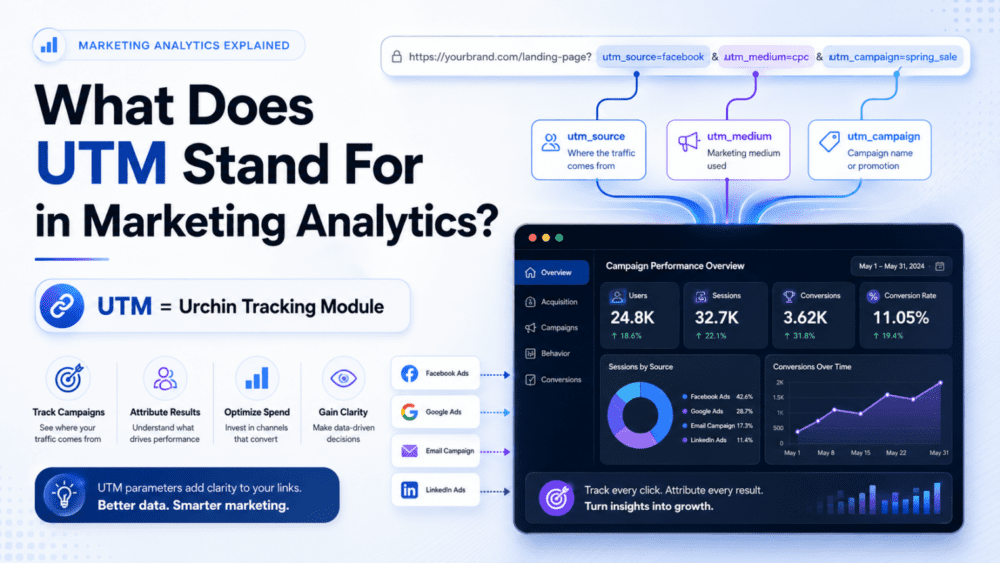
Of all the utm tags, utm_source is the easiest to remember. It tells us where the web visitor came from — Twitter, Instagram, another page, and more.
To put it simply, the utm_source dimension records the addresses or names of the platforms or websites that send traffic to our website.
Therefore, it allows us to go a step down into our reporting from the high-level channel view.
UTM_Source Examples
1. For example, when we are reporting marketing performance for our Social Media channel, we could split the social traffic further by platform name and use utm_source to see which platform is the best performer in this space:
- LinkedIn, etc.
2. In another example, when we analyze our Organic Social channel, we can go a level down by using utm_source to see the actual search engine sites that brought traffic to us, so we can identify the best performers.
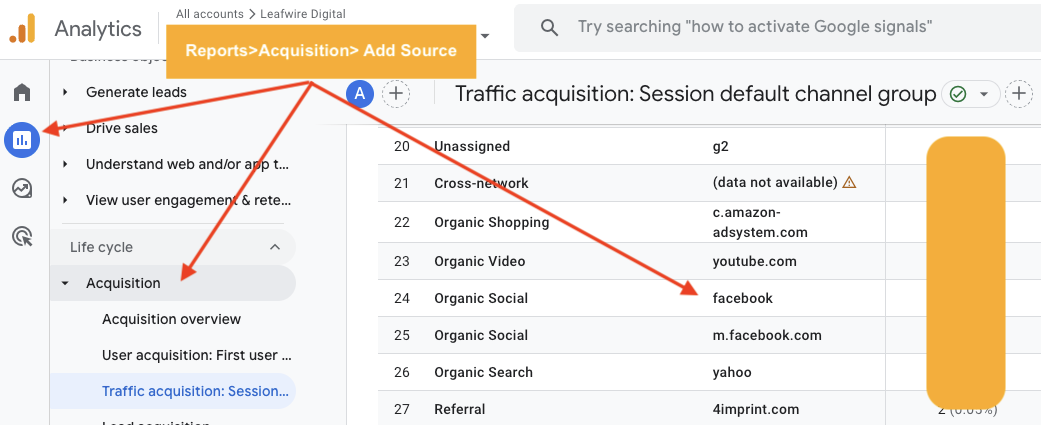
In GA4 utm_source can be found by adding source session to your Traffic Acquisition report
3. Next, if you are investing in paid search across multiple platforms, you might want to see which platform brings the biggest traffic by going a level down from paid search. To do that, simply look up the utm_source dimension in your reports.
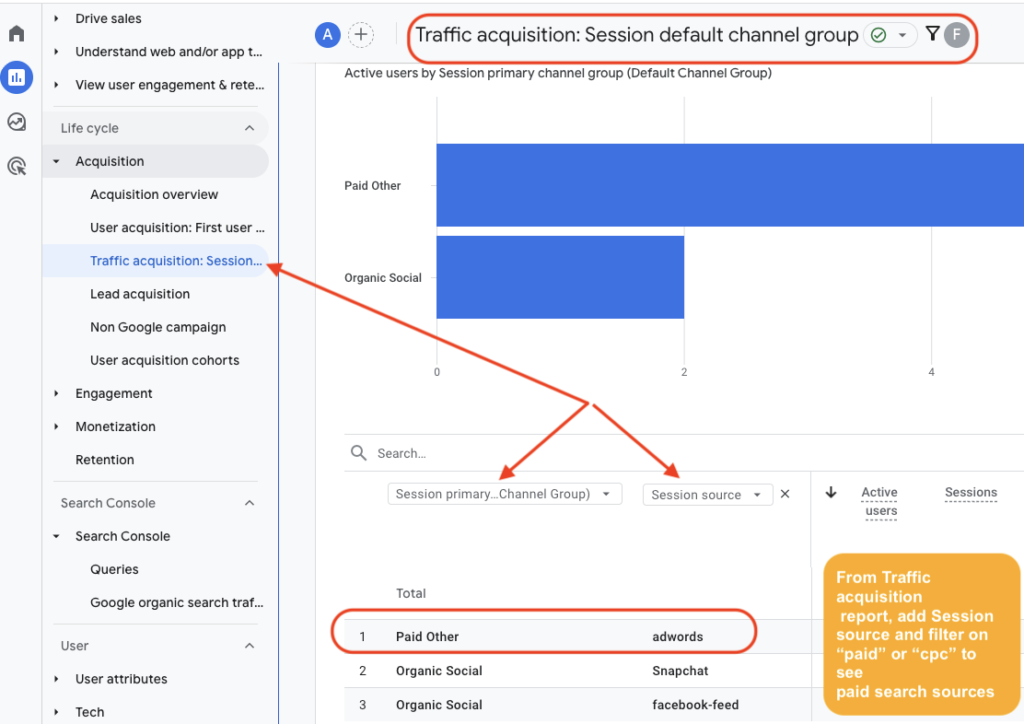
In GA4, go to Reports>Acquisition>Traffic acquisition: Session Default Channel Group and use the + sign to add Session source to see your paid medium utm_source
4. Finally, if you are building your own digital tracking links for custom campaigns like emails or social media, you can access the All Campaigns report and look at utm_source to find out the names of the sites or platforms that brought traffic to a specific campaign.
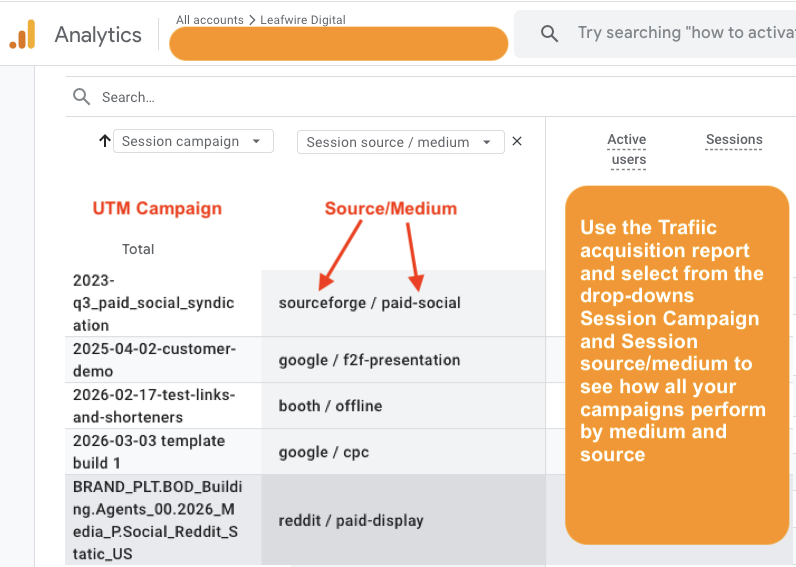
This report shows filtered sessions for UTM Campaign, UTM Source and UTM Medium using the Traffic acquisiiton report
This report is especially useful for campaigns spanning multiple mediums and sources because it can help you compare apples to apples and choose where to invest your marketing dollars next.
Here is a simple presentation of how utm_medium and utm_source work together:
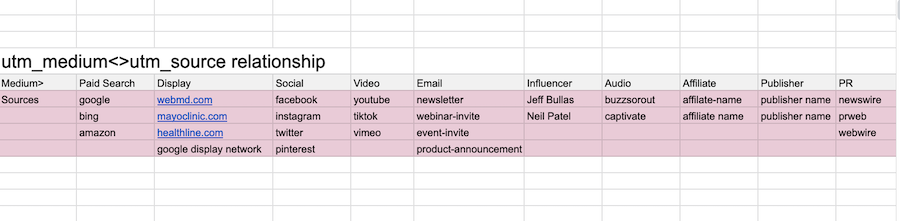
Sample relationship between utm_source and utm_medium values
How to Build and Maintain an Effective UTM Source Library for Optimal Reporting
1. For many marketers, adding UTM tracking tags is an afterthought.
- We are so busy producing results and generating campaigns that sometimes we forget the most important part — adding tracking parameters to our links.
- The image below showcases a prime example of a lack of tracking tags and its result: our hard efforts have remained unrecognized because we didn’t build our tracking links before we promoted them.
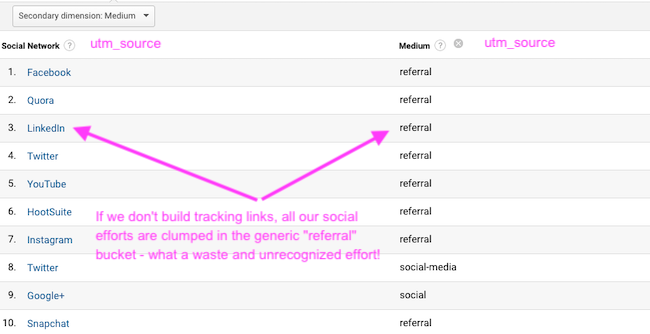
Acquisition Report mislabeling Social traffic as “referrals” when no tracking tags are found in destination URLs
- At least with social channels, Google Analytics recognizes Facebook, LinkedIn, and the rest, and groups their traffic as Social referral traffic.
- However, there are many cases when technical reasons prevent GA from identifying not only the type of traffic, but also where it came from:
- Links from PDF documents, app clicks, gmail, QR codes, and many more sources will send all the traffic into utm_medium=”Direct”, messing up reporting.
2. Add it as a required step in your campaign delivery to ensure consistency
The best way to ensure that you and everyone on your team always tracks your links is to include this step as a mandatory part of your campaign production process, with its own production times and deadlines. In addition, it helps greatly if you make everyone’s life easier by using an automated link tracking platform instead of a spreadsheet.
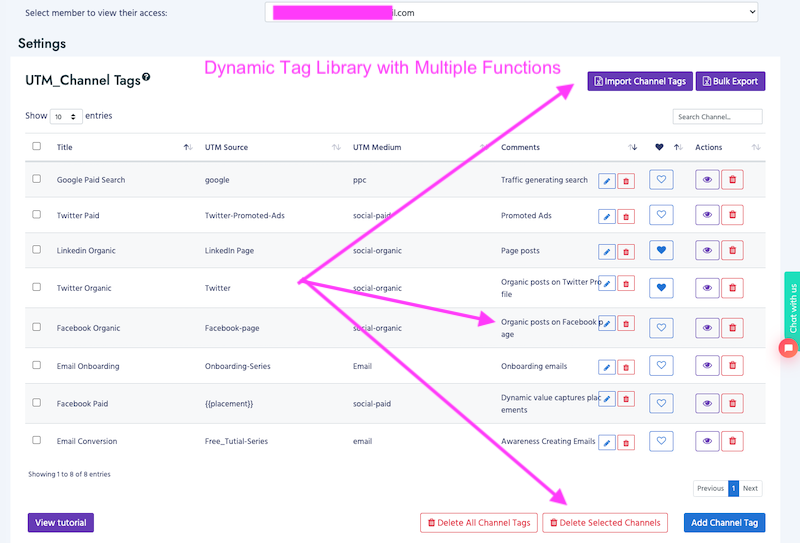
This image shows CampaignTrackly’s UTM_Channel library allowing seamless management of tags
Regarding your utm_source library, our recommendation is to use a dynamic library — one that lives in a specialized link automation tool rather than Excel. Benefits:
- Automatically avoid duplication, control spacing and font case, and make all utm_source tags instantly available to anyone without spreadsheet access or version concerns.
3. Good-practice advice on operationalizing this tag
- Keep a live library of your utm_source tags because today you might be using one publisher, but tomorrow you can add many more
- Always associate a utm_source value with a medium when building your tracking links
4. Pro Tip
- Set up standardized naming conventions for your utm_source tags. Whether you decide to always include .com at the end of websites or use names instead does not matter, as long as you stay consistent throughout the year.
5. Further Reading
- Facebook has multiple sources in addition to its original platform —Messenger, Instagram, and Audience Network.
- Each of those has multiple placements. – Find out how you can add those effectively to your Google Analytics.
- I would also recommend reading how to set up Facebook’s multiple advertising sources dynamically via this blog, written by Ana Kravitz.
Time for a Quiz
Here are six questions that you should be able to confidently answer after reading the tutorial:
Say Good-bye to Manual UTM parameter Work with CampaignTrackly
Now that you are a pro when it comes to utm_medium and utm_source,
our recommendation is to create an Excel spreadsheet that has all of your medium and utm_source tags documented in one place to ensure that your tracking links are consistent and always use the same values.
From Manual to Automated UTM Tagging
And if you are ready to say farewell to manual campaign URL tagging, give our platform a try. We let you import all your tags in one place, where they are instantly available to help you automate and simplify the way you build your campaign tracking links with a click. As a result, you can combine UTM mediums with utm_source values to achieve economies of scale with one-click tagging. However, you can also use them separately.
Pre-Launch Tool
Free 3-Minute GA4 UTM Campaign Tracking QA Checklist
Don’t launch with broken tracking. Use this rapid 3-minute workflow to validate your UTM parameters, including utm_source, and ensure accurate attribution before your first click.
The QA Checklist Covers:
👉 Get the 3-Minute QA Checklist
Stop “Unassigned” traffic before it starts.
FAQ: UTM Source Setup
What is utm_source in Google Analytics?
utm_source is a URL parameter used to identify where traffic to your website originated.
It tells analytics tools like Google Analytics 4 which platform, website, or publisher sent visitors to your page, such as facebook, newsletter, or google.
Why is the utm_source parameter important?
The utm_source tag allows marketers to understand which traffic sources generate visits, conversions, and revenue.
Without it, analytics platforms may group traffic incorrectly or attribute visits to generic channels like referral or direct traffic.
What are examples of utm_source values?
Common utm_source values include:
googlefacebooklinkedinnewsletterpartner-siteinstagram
These values represent the platform or website that referred the visitor to your page.
Example link:
https://example.com/page?utm_source=linkedin&utm_medium=social&utm_campaign=spring-launchWhat is the difference between utm_source and utm_medium?
utm_source identifies the specific platform or website sending traffic, such as facebook or google.
By contrast, utm_medium identifies the type of marketing channel such as email, social, or cpc.
Example:
utm_source=facebook
utm_medium=paid_social
Is utm_source required for campaign tracking?
While technically optional, utm_source is considered one of the three essential UTM parameters used for reliable campaign tracking along with utm_medium and utm_campaign.
Without these tags, marketing attribution reports may become incomplete or inaccurate.
How should you format utm_source values?
Best practices include:
- Use lowercase text
- Avoid spaces or special characters
- Keep naming consistent
- Use hyphens or underscores as separators
Example:
utm_source=linkedin
utm_source=email-newsletter
Consistency ensures your analytics platform groups traffic correctly.
Where can you see utm_source data in Google Analytics?
In GA4 reports, utm_source populates dimensions like:
- Session source
- Source / medium
- Traffic acquisition reports
These reports show which platforms are driving the most traffic and conversions.
Can you track multiple platforms with utm_source?
Yes. Each campaign link should contain a different utm_source value for each platform.
Example:
- LinkedIn →
utm_source=linkedin - Facebook →
utm_source=facebook - Email →
utm_source=newsletter
This allows marketers to compare campaign performance across channels.
Do UTM parameters affect SEO?
No. UTM parameters do not impact search engine rankings. They simply append tracking data to URLs so analytics tools can measure campaign performance.
However, UTM links should not be used for internal website links, as they may disrupt attribution tracking.
What tools can help create utm_source tracking links?
Many marketers use automated URL builders to generate consistent tracking links, such as:
- UTM link builders
- Marketing automation platforms
- Campaign governance tools
These tools help enforce naming conventions and prevent tracking errors.
What to Expect in Our Next Tutorial
Tut #3 will continue looking at your UTM link tracking strategy within the framework of your analytics and reporting tools. Next, we will delve into UTM_Campaign, what it really is, and how to set it up. Sign up for the series to get notified when the next tutorial is out.