
A UTM link is a regular website URL with campaign tracking information added to the end. Marketers use UTM links to understand where traffic comes from, which campaign drove the click, and how visitors behave after they land on a website.
In simple terms, a UTM link helps tools like Google Analytics 4 connect a website visit back to a specific marketing campaign, email, ad, social post, QR code, or partner link.
What Is a UTM Link?
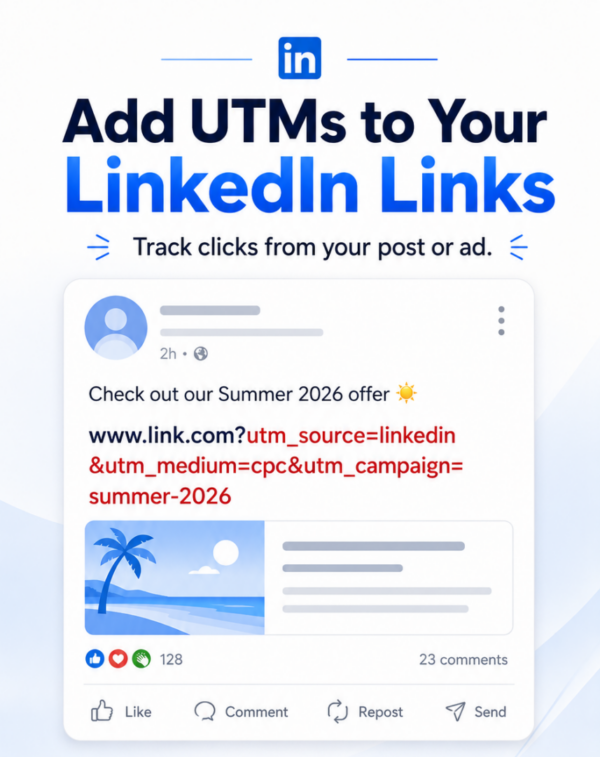
A UTM link is a destination URL that includes UTM parameters. These parameters are small pieces of text added after a question mark in the URL.
For example, this is a regular link:
https://www.example.com/pricingAnd this is a UTM link:
https://www.example.com/pricing?utm_source=linkedin&utm_medium=social&utm_campaign=spring_launchThe page destination is still the same. However, the second link also tells your analytics platform that the visitor came from LinkedIn, through a social campaign, as part of the spring launch campaign.
What Are UTM Links Used For?
UTM links are used to track campaign performance across different marketing channels. They help marketers see which links, platforms, and campaigns are driving traffic, conversions, and revenue.
You can use UTM links for email campaigns, paid ads, organic social posts, banner ads, influencer links, partner campaigns, QR codes, and offline promotions that send people to a website.
UTM Links vs Regular Links
A regular link sends someone to a webpage. A UTM link sends someone to the same webpage but also carries campaign tracking details with it.
This is why two links can lead to the exact same landing page but appear differently in analytics reports. The UTM version gives your reporting tools more context about the click.
UTM Links vs UTM Parameters
UTM parameters are the individual tracking fields inside a UTM link. A UTM link is the full URL after those parameters have been added.
For example, in the link below, the UTM parameters are utm_source, utm_medium, and utm_campaign:
https://www.example.com/demo?utm_source=newsletter&utm_medium=email&utm_campaign=june_promoTogether, those parameters turn the original URL into a trackable UTM link.
The Main Parts of a UTM Link
Most UTM links include three core parameters: source, medium, and campaign. These help explain where the click came from, what type of channel sent it, and which campaign the link belongs to.
- utm_source: Identifies the platform, publisher, or traffic source, such as Google, LinkedIn, newsletter, or partner name.
- utm_medium: Identifies the marketing channel, such as email, paid social, CPC, organic social, display, or QR.
- utm_campaign: Identifies the campaign name, promotion, launch, or marketing initiative.
- utm_content: Helps distinguish different ads, buttons, creatives, or placements within the same campaign.
- utm_term: Often used for paid search keywords or other targeting details.
How to Create a UTM Link
To create a UTM link, start with the destination URL and then add your campaign tracking parameters. The first parameter begins with a question mark, and each additional parameter is separated by an ampersand.
Here is the basic format:
https://www.example.com/page?utm_source=source&utm_medium=medium&utm_campaign=campaign_nameBefore using the link, check that the URL opens correctly, the parameters are spelled consistently, and the campaign naming matches your reporting standards.
Common UTM Link Mistakes
UTM links are simple in theory, but small mistakes can create messy analytics reports. Inconsistent naming, broken formatting, missing parameters, and manual typos can all make campaign performance harder to measure.
- Using different spellings for the same source, such as
linkedin,LinkedIn, andlinked_in. - Mixing channel names, such as
paid-social,paidsocial, andpaid_social. - Forgetting required parameters like
utm_sourceorutm_medium. - Adding UTM parameters after a hashtag instead of before it.
- Using long, unclear campaign names that are hard to read in reports.
Why UTM Links Matter in GA4
Google Analytics 4 uses UTM links to help classify campaign traffic. When UTM links are built correctly, GA4 can show which campaigns, sources, and channels are bringing users to your website.
When UTM links are inconsistent or incomplete, traffic may be misclassified, grouped incorrectly, or become harder to analyze. That makes it harder to understand what is actually working.
How CampaignTrackly Helps with UTM Links
CampaignTrackly helps teams create consistent UTM links without relying on messy spreadsheets or manual URL builders. Instead of letting every marketer create tracking links differently, teams can use shared naming rules, approved values, templates, and validation.
This helps improve campaign data quality, reduce manual mistakes, and keep marketing links organized across channels, teams, and campaigns.
FAQs About UTM Links
What does UTM link mean?
A UTM link is a URL that includes campaign tracking parameters. These parameters help analytics tools identify where traffic came from and which marketing campaign generated the visit.
Are UTM links different from normal links?
Yes. A normal link only sends users to a webpage, while a UTM link also includes tracking details that help measure campaign performance.
Do UTM links change the landing page?
No. UTM links usually send visitors to the same destination page. The tracking parameters are added for analytics purposes and do not normally change the page content.
Can UTM links be used in emails?
Yes. Email campaigns are one of the most common uses for UTM links because they help identify which newsletter, button, or email campaign drove the click.
Can UTM links be used for QR codes?
Yes. A QR code can point to a UTM link, which helps marketers track offline campaigns, printed materials, event signage, brochures, and direct mail.
What is the difference between UTM links and UTM tags?
UTM tags are the individual tracking fields added to a URL. A UTM link is the complete trackable URL that contains those tags.
“`
Looking for more UTM resources?
- Subscribe to our YouTube 30-second bite-sized tutorial videos
- Get certified with our UTM Campaign Tracking Certification
- Sign up for our platform and run a GA4 utm campaign data quality audit for free
- Download our free Campaign Launch checklist
- Build UTM Links with CampaignTrackly
How CampaignTrackly Automatically Fixes URL String Fragments
Instead of relying on rigid, error-prone spreadsheet formulas, CampaignTrackly’s intelligent parsing engine automatically detects page hashtags, dynamically isolates them, sequences your UTM parameters using the correct syntax separators, and safely re-attaches the anchor to ensure flawless user navigation and 100% accurate analytics.







