
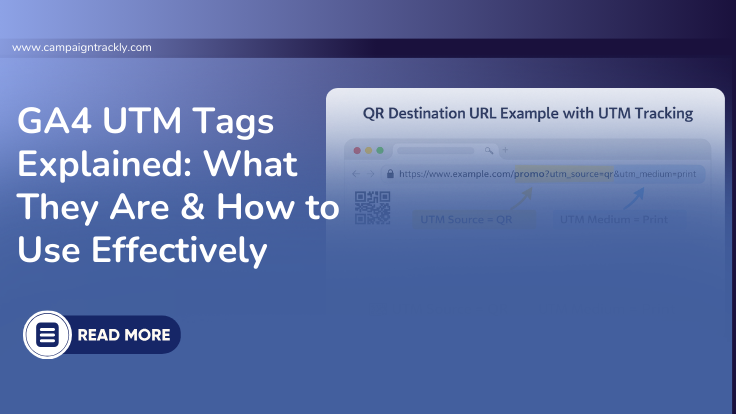
1. UTM Tags: What They Are and How They Help Track and Measure Marketing Campaigns
UTM tags (also known as UTM parameters or UTM codes) are small snippets of tracking code added to the end of a webpage URL. They help you segment and measure the traffic coming from your marketing campaigns to your website, blog, or promotional pages.
The Process if Using UTM Tags in a Nutshell
First, you add your UTM tags to a page destination link. Then you promote it on Linkedin or Facebook. When people start clicking on your promotion—your web analytics tool (Google Analytics, for example) reads the tracking codes. Each code “tells” Google how to group incoming traffic — giving you actionable insights.
In simple terms, this is what UTM Tags are:
UTM tags are tracking labels that tell your analytics software where your traffic came from and how.
2. Why Do You Need UTM Tags?
As of late, online paid media advertising spend just hit a trillion dollars. And UTM tags are the most reliable way to measure an investment of this size effectively.
UTM link tracking allows performance-driven organizations to:
-
Understand which marketing campaigns drive traffic
-
See which channel— Email versus Paid Search vs Paid Social, for example—brings the best customer engagement
-
Identify most expensive and least expensive lead acquisition initiatives
-
Optimize marketing ROI
-
Justify budget allocation
Without UTM tags, much of your marketing generated traffic will be misplaced
All your campaign-initiated website traffic and engagements will get lost in general traffic, making it difficult to identify what truly drives results.
Pre-Launch Tool
Free 3-Minute GA4 UTM Campaign Tracking QA Checklist
Don’t launch with broken tracking. Use this rapid 3-minute workflow to validate your UTM parameters and ensure 100% accurate attribution before your first click.
The QA Checklist Covers:
👉 Get the 3-Minute QA Checklist
Stop “Unassigned” traffic before it starts.
3. How to Use UTM Tags for Campaign Destination Links
Get to Know Your UTM Tags and How to Use Them
UTM_Campaign
Firstly, this is a very important and required tag. We use it to record your campaigns and group all links based on the campaign they belong to.
For example, if you have a url link www.yahoo.com, right after it you can add the code below:
This code will help Google Analytics to group all people who clicked on this link in one reporting bucket.
How UTM_Campaign works in reports
In short, if 100 people clicked on the link with the “thanksgiving-fall-2026-discount” utm_campaign value, in GA4 traffic report, we will see the number 100 against that campaign name. If multiple campaigns drive traffic to the same landing page, this tag allows you to see which campaign performed best.
UTM_Source
This parameter is a required tag, used to identify where the traffic came from.
Example:
It allows you to compare platforms such as Twitter, LinkedIn, Google, or Email and how much traffic they are sending to a specific page.
UTM_Medium (Marketing Channel)
Also required by Google Analytics, this tag defines the marketing channel, also known as medium.
Example:
While utm_source shows you the website or platform from where the visit originated, in contrast, Medium is often used to differentiate paid vs organic traffic from the same source.
Mediums are also known as the Google Analytics standard default channels. When setting up your mediums they have to be the same as the ones on GA4 if you want to have best-performing campaign tracking and reporting.
UTM_Term
Commonly used for keyword tracking, especially in paid search, this tag is not required – but useful.
Example:
It can also be used creatively to segment specific components within a campaign.
UTM_Content
Used to differentiate multiple assets or creative variations within the same campaign, this tag is also not required.
Example:
Important Formatting Rule
-
Use “?” before the first UTM tag
-
Use “&” to add additional UTM parameters
Example:
UTM tags do not break URLs. In addition, they do not impact the user experience either. The visitor sees the same page — the only difference is that analytics tools now categorize that visit correctly.
4. When To Use Your UTM Tags
Here is a simple diagram which can help you find out when UTM tags are required in your digital marketing links:
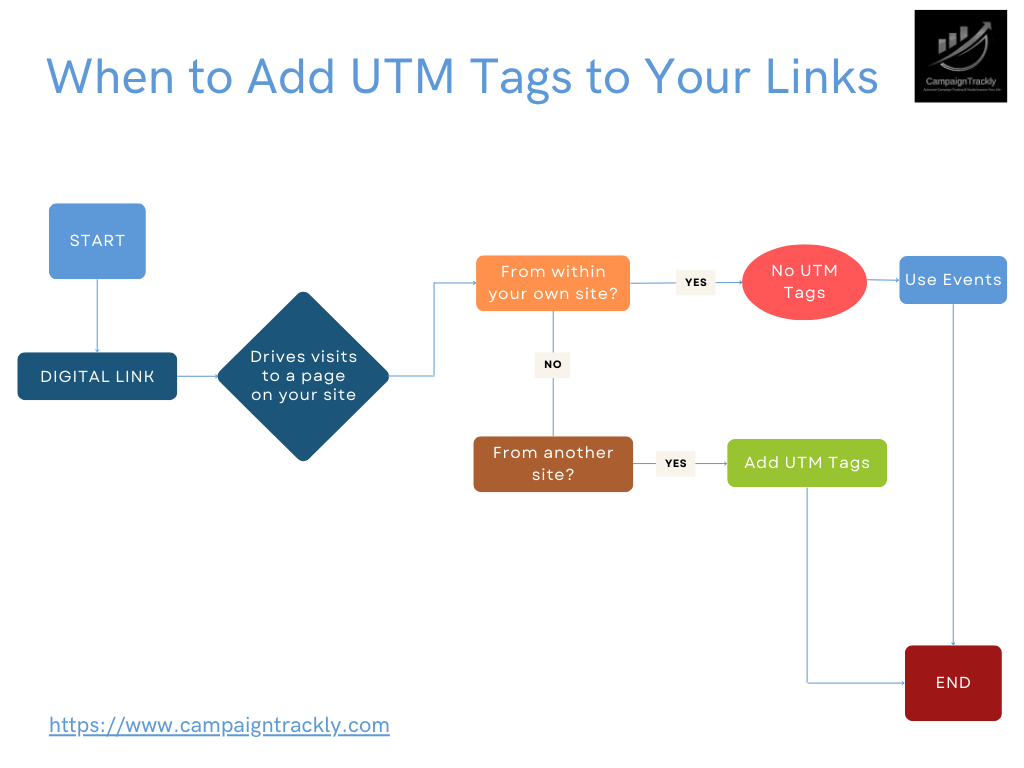
Use UTM tags for:
-
Email campaigns
-
Paid social ads
-
Paid search campaigns
-
Social media posts
-
Display advertising
-
Affiliate campaigns
Do not use UTM tags for:
-
Internal website links
-
SEO internal linking
5. Why Are UTM Tags So Important for Marketing Reporting?
Without them, it is impossible to track campaign performance. UTM tags help analytics platforms provide better, clearer insights without requiring significant investment.
When used consistently, UTM tracking improves:
-
Campaign attribution
-
Channel performance analysis
-
Lead generation reporting
-
Return on ad spend (ROAS)
-
Marketing effectiveness measurement
Without UTM tags, analytics tools cannot properly differentiate campaigns, making performance comparisons unreliable.
6. What Happens If You Don’t Use UTM Tags?
If you do not use UTM tracking, your analytics reports group traffic together in general categories.
This makes it difficult to:
-
Identify high-performing campaigns
-
Measure marketing effectiveness
-
Prove ROI
-
Justify marketing spend
UTM tags ensure your campaigns receive proper credit for the results they generate.
7. Real-life UTM Tags Use Case
See how easy it is to report on your marketing successes using UTM tags in Google Analytics:
8. Why the UTM Tagging Process Is Not Without Challenges?
Quick answer: UTM tagging requires adding consistent tracking labels to your URLs so analytics tools can accurately track where campaign traffic comes from. If consistency is compromised, your reporting data will quickly break down.
Why Consistency Might Break
The UTM tagging process requires precision. However, it is challenging to leave no room for error when modern marketing campaigns rarely have just a handful of channels or links while the tagging process is mostly manual.
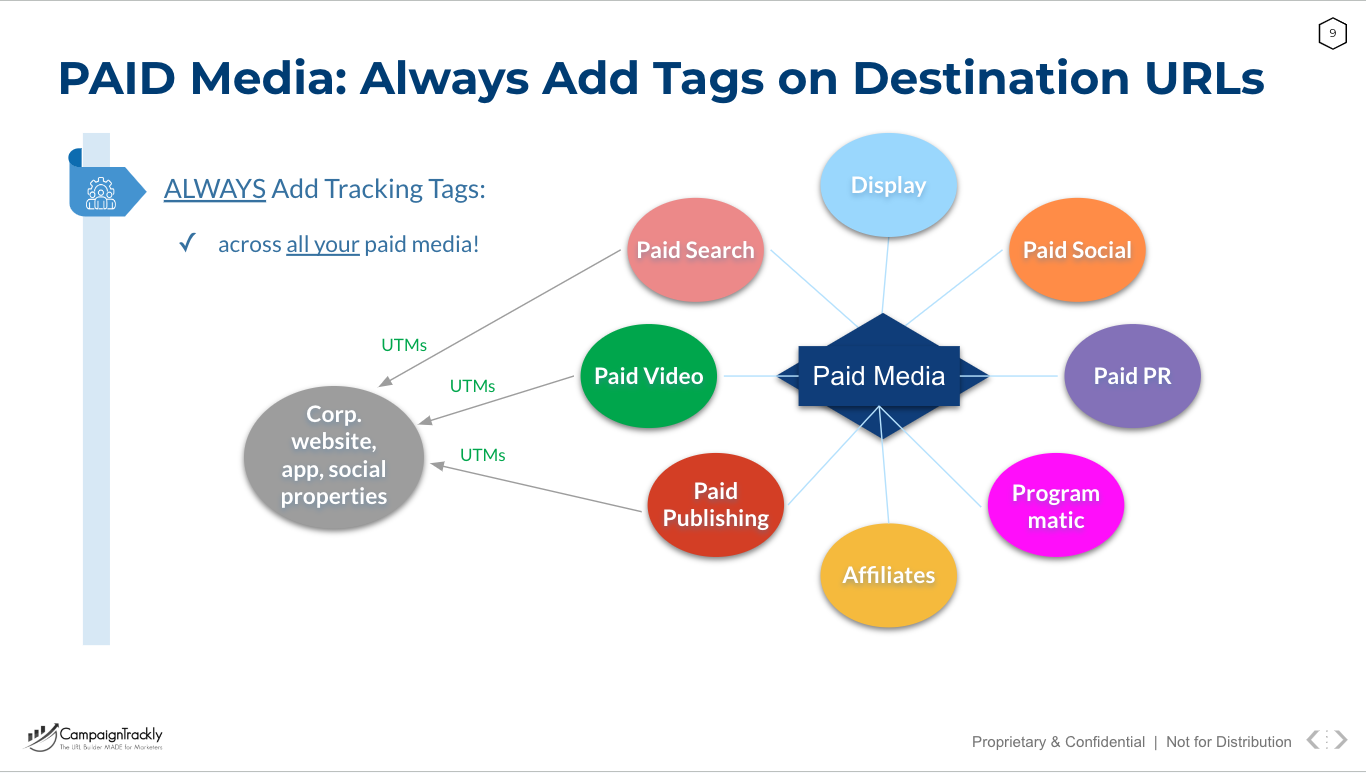
Paid Media alone has a multitude of platforms, each requiring specific tracking macros and tagging components:
9. Why Enterprise Teams Move Beyond Basic URL Builders
Precision and Consistency Require Governance and Automation
An enterprise-level marketing campaign rarely relies on a single link. Instead, a campaign might require rigorous tracking across dozens of moving parts at any given time:
-
Omnichannel Execution: Managing multiple marketing channels and staggered start dates simultaneously.
-
Targeting and Creative Variations: Juggling diverse target audiences alongside unique creative assets.
-
Granular Tracking: Isolating performance across varied keywords, individual ads, and targeted email sequences.
-
Hybrid Campaigns: Bridging the gap between offline QR codes and distinct digital landing pages.
Increased Risks as Volume Grows
When campaign links multiply daily and every single one must carry standardized tracking labels, managing this process manually quickly fails the scalability test. Not only does manual URL building become time-consuming and highly inconsistent, but it also introduces data errors that create a massive reporting risk.
The Hidden Mistakes That Break Your Data
Because in addition to tagging, teams frequently have to shorten links for social media, generate QR codes for SMS or offline print, or tweak links for specific paid ad platforms – every next manual step introduces more room for tracking errors.
If you build your links manually in spreadsheets, you are likely running into at least three hidden campaign tracking issues:
-
Brittle Formulas: Standard spreadsheet formulas will ruin your data reporting pipeline if you use page anchors or hashtags. See why Excel formulas break hashtag links.
-
Unassigned Traffic: Using the wrong characters in your strings will confuse Google Analytics. Learn how to avoid GA4 unassigned traffic by using URL-safe UTM tag separators.
-
Broken Syntax: One tiny typo can blind your marketing reports. Review these common campaign tracking issues to see what else might be misfiring in your setup.
With so many UTM tracking links required for daily operations, relying on manual processes makes it almost impossible to maintain clean analytics.
Manual or traditional URL builders:
-
Create one link at a time
-
Don’t enforce naming standards
-
Don’t prevent duplicates
-
Don’t provide governance.
10. How CampaignTrackly Creates Value
CampaignTrackly automates the generation of UTM tracking parameters and campaign URLs. It streamlines the tracking process so marketers can monitor every promotion accurately — without spending excessive time managing links.
With CampaignTrackly, you can:
-
Generate multiple UTM links quickly
-
Maintain consistent naming conventions
-
Shorten links automatically
-
Connect to analytics and shortener platforms
-
Gain instant visibility into campaign performance
Instead of spending time formatting links, marketers can focus on optimizing performance.
11. How CampaignTrackly Solves UTM Tracking at Scale
CampaignTrackly transforms manual UTM tagging into a governed workflow through these automated processes:
- Enforcing lowercase naming conventions
- Standardizing approved sources & mediums
- Preventing duplicate campaign names
- Generating bulk UTM links
- Shortening links automatically
- Integrating with 100+ platforms
- Centralizing campaign reporting
Instead of generating one link at a time, you create governed tracking systems.
Free GA4 Audit
Free GA4 Campaign Data Integrity Audit
Analyze your campaign metadata and expose hidden attribution risks. Surface issues in seconds that typically take analysts days to discover manually.
The Audit Includes:
👉 Run Integrity Audit & Get Score
Clear, actionable recommendations provided instantly.
Ready to standardize your UTM tags and eliminate tracking errors?
👉 Explore the CampaignTrackly Google Analytics UTM Builder
👉 Run a UTM Tracking Audit
👉 Visit our UTM tracking tutorials page
FAQs
1) What are UTM tags?
UTM tags (also called UTM parameters or UTM codes) are short tracking values added to the end of a URL. They help you do UTM tracking by telling analytics tools where a visitor came from (source), how they arrived (medium), and which campaign drove the click (campaign).
2) Are UTM tags the same as UTM parameters or UTM codes?
Yes. UTM tags, UTM parameters, and UTM codes all refer to the same thing: URL parameters used for campaign tracking and reporting.
3) Which UTM tags are required?
For most UTM tracking, the “core three” are:
-
utm_source (where traffic comes from)
-
utm_medium (the channel)
-
utm_campaign (the campaign name)
The optional UTM tags are utm_term (often keywords) and utm_content (creative/asset variations).
4) How do I add UTM tags to a link correctly?
Add UTM tags after your URL using:
?before the first parameter
&between parameters
Example:https://example.com/?utm_source=linkedin&utm_medium=paid_social&utm_campaign=spring_launch
5) Where do UTM tags show up in Google Analytics 4?
In GA4, UTM tracking is commonly reviewed in Acquisition reports (Traffic acquisition) using dimensions like Session source/medium and Session campaign.
6) Should I use UTM tags on internal website links?
Generally, no. UTM tags are meant for external campaign links (email, social, ads). Using them on internal links can make reporting confusing because it can overwrite the original acquisition source for the session.
7) Do UTM tags affect SEO or page performance?
UTM tags don’t change page content or load speed. They’re just URL parameters for reporting. If you’re concerned about duplicates being indexed, you can use analytics/reporting practices and canonical handling as needed—but UTM tags themselves are primarily about tracking.
8) What’s the easiest way to create UTM tags without mistakes?
A UTM builder helps generate properly formatted links faster and reduces errors (misspellings, missing parameters, inconsistent naming). It’s especially helpful when you’re creating multiple campaign links across channels.







