
How to shorten a URL? The process is simple, as long as you have a shortener app or software: copy your long link, paste it into your designated URL shortener, and generate a small link that is easier to share.
How to Shorten a URL – Here Are the 3 Simple Steps
- Copy the long URL you want to shorten.
- Paste it into a URL shortener or link management platform.
- Generate the short link, test it, and then share it in your campaign, email, social post, QR code, or document.
Some tools only create a simple short link. Others also support tracking, QR codes, custom domains, UTM parameters, team access, and reporting.
Shortening a URL for Personal vs Company Use
For personal use, a free shortener may be enough. For marketing and business use, it is usually better to use a platform that also manages campaign tracking, naming rules, QR codes, analytics, and user access.
Here are three easy ways to shorten a URL, depending on whether you need a quick one-time link, a reusable shortener account, or a business link management process.
Option 1: Use a Free URL Shortener for a Quick Link
If you only need to shorten one URL quickly, you can use a free URL shortener such as TinyURL.
- Best for: one-off links, personal links, quick sharing, and simple redirects.
- Where to access it: TinyURL
- What is useful: you can create a short link quickly and customize the back-half of the URL.
- What to watch for: free or lightweight shorteners may offer limited reporting, governance, branding, and team management.
Option 2: Use a URL Shortener Account for Repeat Use
If you shorten URLs regularly, a shortener account can make it easier to save, organize, and reuse your links.
For example, tools like Bitly allow users to create shortened links, manage them from an account, and access additional features depending on the plan.
- Best for: recurring short links, branded links, and basic link reporting.
- Where to access it: Bitly
- What is useful: it is simple to use and familiar to many marketers.
- What to watch for: pricing, monthly link limits, reporting limits, and branded domain requirements can vary by plan.
Option 3: Shorten URLs for Business Campaigns and Teams
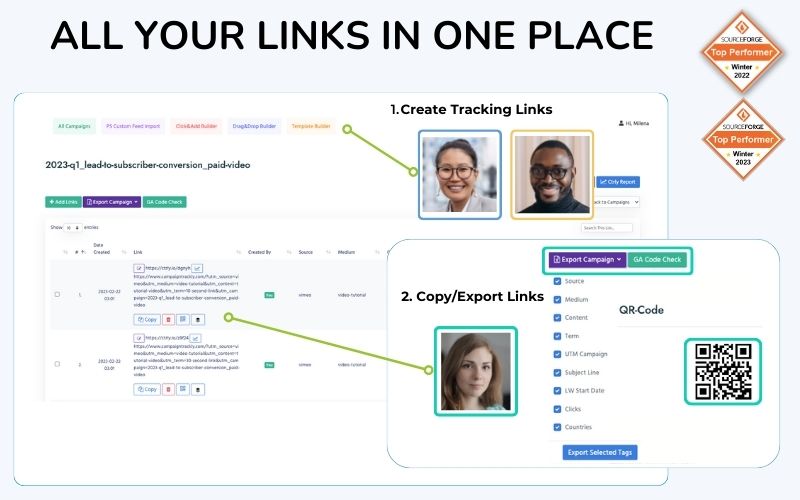
This is product screengrab from the CampaignTrackly Campaign URL Builder, Shortener, and QR Code Generator platform, which manages the complete link lifecycle of your campaigns
Business teams usually need more than a short link. They need short URLs that are easy to manage, properly tagged, easy to report on, and safe for multiple team members to create.
This is where a link management platform can help. Instead of creating disconnected short links across different tools, teams can manage campaign URLs, UTM parameters, short links, QR codes, custom domains, and reporting rules in one place.
What to Look for in a Business URL Shortener
- Campaign tracking: The tool should support UTM tags so your short links still feed clean data into GA4, Adobe Analytics, and other reporting platforms.
- Custom domains: You should be able to use your own branded short domain instead of being locked into one provider.
- QR code support: If your team uses offline campaigns, events, print assets, or packaging, QR code generation can save time.
- Team governance and campaign naming conventions: The platform should let admins control naming conventions, required fields, user permissions, and campaign rules.
- Automated UTM Builder tool that stops link tagging errors and prevents inaccurate reporting.
- Centralized reporting: Your team should be able to find, manage, and report on campaign links after they are created.
- Integrations: A strong platform should work with your broader marketing workflow, including campaign URL builders, analytics tools, APIs, webhooks, and exports.
URL Shortener vs. Campaign URL Builder
A URL shortener makes a long link shorter. A campaign URL builder helps create tracking links with UTM parameters. For marketing teams, the best setup often combines both.
| Feature | Basic URL Shortener | Campaign URL Builder + Link Management |
|---|---|---|
| Shortens long URLs | Yes | Yes |
| Custom short links | Sometimes | Yes |
| UTM tracking | Limited or manual | Yes |
| QR code generation | Sometimes | Yes |
| Team permissions | Limited | Yes |
| Naming conventions | No or limited | Yes |
| Campaign reporting support | Basic | Stronger |
How CampaignTrackly Helps Teams Shorten and Manage URLs
CampaignTrackly helps teams create, shorten, tag, organize, and manage campaign links from one platform. Its top-rated Google URL Builder drives exceptional productivity for teams while eliminating messy links and broken data. Its Adobe URL Builder helps large enterprise teams optimize advanced link tracking setups with ease.
Instead of using separate tools for UTM links, short URLs, QR codes, naming rules, and reporting exports, teams can keep their link workflow centralized.
- Create campaign URLs with governed UTM parameters.
- Shorten links using connected shortener providers.
- Generate QR codes for campaign links.
- Manage custom domains and link assets in one place.
- Enforce naming conventions across teams.
- Control who can create, edit, and manage campaign links.
- Improve reporting accuracy by reducing manual tagging mistakes.
Learn more about CampaignTrackly if your team needs a scalable way to manage campaign URLs, UTM links, short links, QR codes, and reporting workflows.
FAQ About Shortening URLs
What is the easiest way to shorten a URL?
The easiest way to shorten a URL is to paste your long link into a URL shortener, generate the short version, and test the link before sharing it.
Can I shorten a URL with UTM parameters?
Yes. You can shorten a URL that contains UTM parameters. However, you should always test the final short link to make sure it redirects correctly and keeps the tracking parameters intact.
Do shortened URLs affect analytics reporting?
Shortened URLs can work well with analytics platforms when the original destination URL is tagged correctly. If the UTM parameters are missing, inconsistent, or placed incorrectly, reporting can become unreliable.
Should businesses use a free URL shortener?
A free URL shortener can work for simple links. Businesses usually need more control, including branded domains, UTM governance, QR codes, permissions, reporting, and centralized link management.







